

Sports products run on data. Odds, player metrics, shot maps, power numbers, expected goals, possession chains. Information is the backbone of decision making across betting, coaching, performance, broadcast and fan platforms.
Yet most of that information never becomes understanding.
A dashboard can be rich in intelligence and still feel heavy to use. A chart can be accurate and still be unclear. When every number competes for attention, even high value insight becomes background noise. Designing sports data is not about showing more. It is about reducing the effort required to interpret.
Good data UX creates confidence. It reduces cognitive strain. It lets a user form meaning faster than they expect to.
Where most sports data design breaks down
It is tempting to believe that adding more context, more charts and more metrics makes a product more powerful. In practice, the opposite often happens. Interfaces expand, hierarchy collapses, and the user is forced to work through information rather than flow through it.
Three failure patterns appear repeatedly.
Everything is presented with equal weight
When all numbers look important, nothing feels important.
Users begin scanning instead of understanding.
Data is delivered without story
Raw stats demand interpretation. Most users do not arrive wanting to analyse. They want to know what they should feel or do next.
Clarity relies on effort
If meaning is earned rather than revealed, only expert users benefit. Casual users opt out quietly and never return.
Sports data design succeeds not when it compresses information, but when it sequences it. The right detail, shown at the right depth, at the right moment.
This is why I use the framework below.
The Bite, Snack, Meal Model
A method for turning complex sports data into digestible experience
The idea is simple. Users consume information in layers. They rarely want everything at once. They want the quickest possible path to understanding, and the option to go deeper only if they choose to.
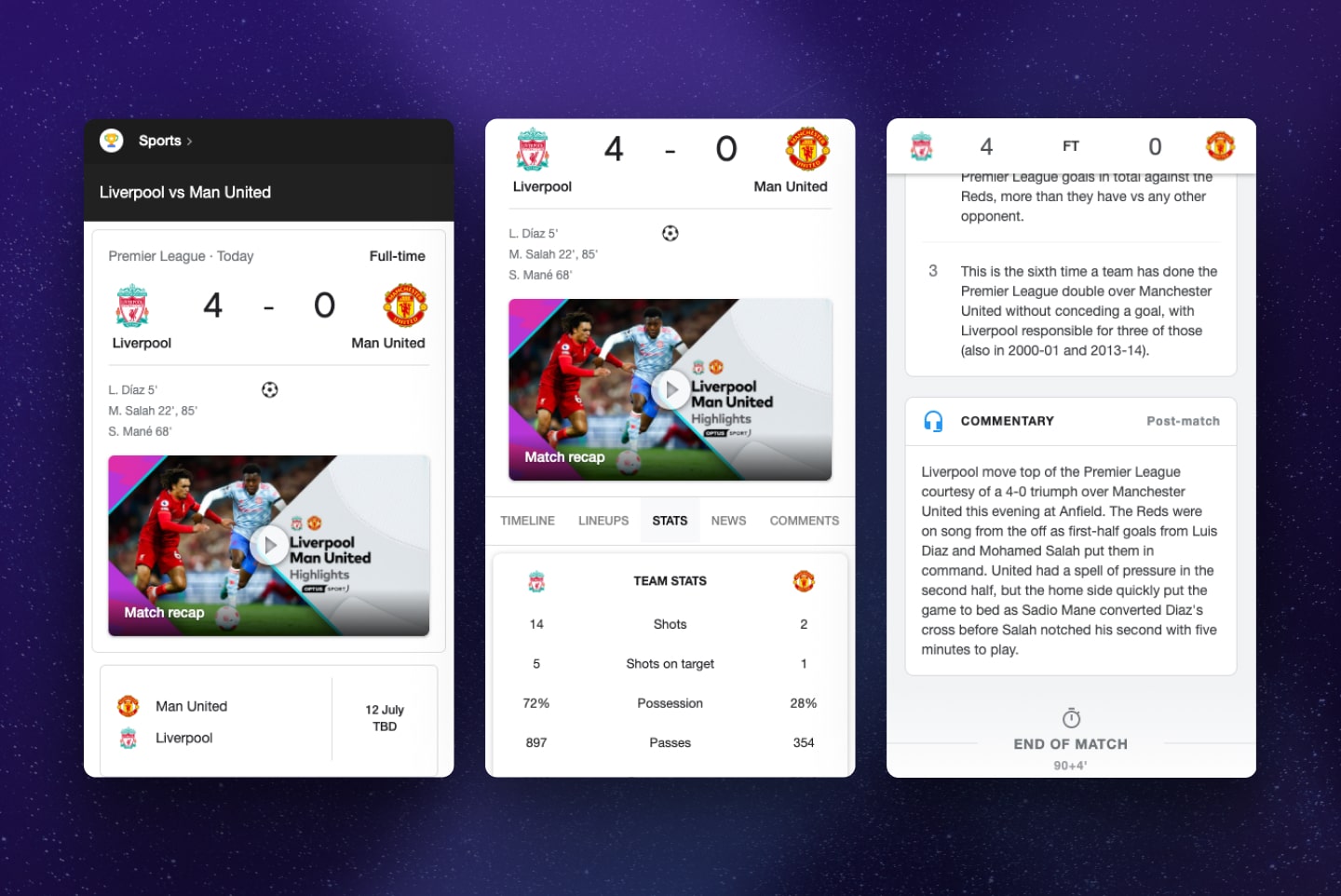
Bite: The Quick Take
The surface layer. The immediate takeaway.
It is the single insight that answers the fastest question in the user’s mind.
Examples:
- Win probability
- Player rating
- Current form colour state
This layer is about recognition. No thinking required. If a user cannot absorb the Bite in one glance, the rest of the design does not matter.
Snack: The Supporting Detail
The supporting context.
It explains how we arrived at the Bite and why it is credible.
Examples:
- A small trend chart
- Last five games comparison
- Contributing factors summary
The Snack rewards curiosity without demanding it. It bridges instinct and understanding.
Meal: The Full Breakdown
The depth layer. Complete information for users who want to explore, compare or interrogate.
Examples:
- Full stat breakdowns
- Interactive filters
- Comparative dashboards
This is where analysis lives. The Meal exists for experts, analysts and coaches, but it does not need to dominate the interface. It sits where it can be found, not where it must be confronted.
Bite captures attention.
Snack builds trust.
Meal rewards investment.
How the framework exists in the real world
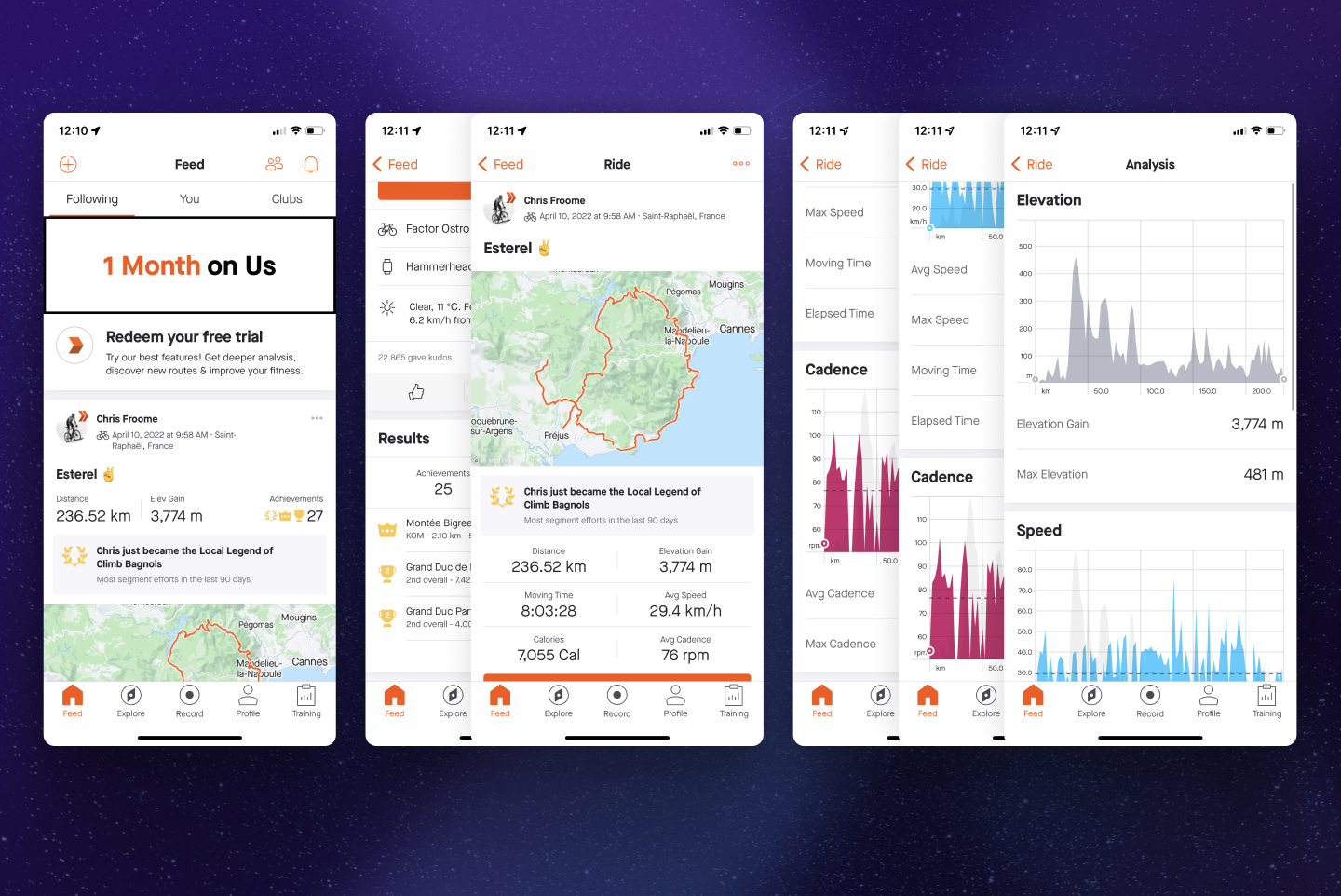
Look at Strava. It is not used because it simplifies training data. It is used because it reveals information in the order a human wants to see it.
The Bite is the activity summary. Distance, duration, elevation.
The Snack is pacing trends, improvements, comparisons.
The Meal sits deeper in power curves, heart zones and splits.
Strava is successful because it respects attention. Not by removing depth, but by sequencing it. Sports platforms with dense analytics can feel the same when structured with intent.
Designing data that builds confidence instead of effort
Good data UX is not decorative. It is architectural. Every number has to justify the space it occupies. Every chart needs a reason to exist.
A few principles I return to often:
Meaning before metrics
Users do not want numbers. They want what numbers imply.
A stat only becomes valuable when it answers a question, reduces uncertainty or shapes a decision. Labelling a table with “xG” or “Power Index” does little. Labelling it with “Chance Quality” or “Impact on Outcome” gives it purpose. Insight should arrive faster than interpretation.
Hierarchy is navigation
The eye looks for anchors. It needs a place to land.
Scale, contrast and whitespace are maps, not decoration. When hierarchy collapses, every element competes. When hierarchy is deliberate, the interface guides the user without them realising. The design should tell them what to look at before they choose to look deeper.
Context shapes cognition
A coach reviewing post-match analytics and a bettor checking live odds are not in the same mental state. One has time to explore. The other needs immediacy. Designing for persona alone is not enough. Designing for mindset is what changes behaviour. The interface must bend to context, not demand that context bend to it.
Familiarity reduces cognitive cost
Users read new information through old mental models.
We do not learn to interpret data from scratch each time. We borrow patterns from everywhere we spend attention: banking breakdowns, fitness rings, portfolio dashboards. Reusing familiar structures is not unoriginal. It is efficient. It lowers the cost of understanding and accelerates meaning.
Real-World Example: Applying Bite, Snack, Meal
In a recent sports analytics project, I applied the framework like this:
Bite: A simple insight card showing Top player impact score: 8.7
Snack: A small chart showing how that score evolved over time
Meal: A full dashboard where users could compare players, teams, or time periods
This structure works because it respects attention. Users can stay at surface level or choose to go deeper without friction.
Common Mistakes in Data-Driven Products
Even experienced teams make predictable errors when designing analytics interfaces:
- Every metric looks equally important
- Charts are added without purpose
- Dashboards are static and unresponsive
- Explanations are hidden behind tooltips instead of clear layout
Good design does not hide complexity. It manages it.
Final Take: Designing for Digestibility
Digestibility is not about simplifying data. It is about presenting it in a way that respects human attention. By structuring information as Bite, Snack, and Meal, users can consume as much or as little as they need without feeling lost.
When data feels digestible, users feel in control. That sense of clarity turns uncertainty into confidence and confidence into loyalty.
Explore more sports UX articles for deeper insights into design systems, data visualisation, and betting experiences.



Leave A Comment
You must be logged in to post a comment.